Khan Academy Kids
- 4.6
- Rating
- 10.00M
- Installs
- Free
- Price

 Analysis by App-foxy
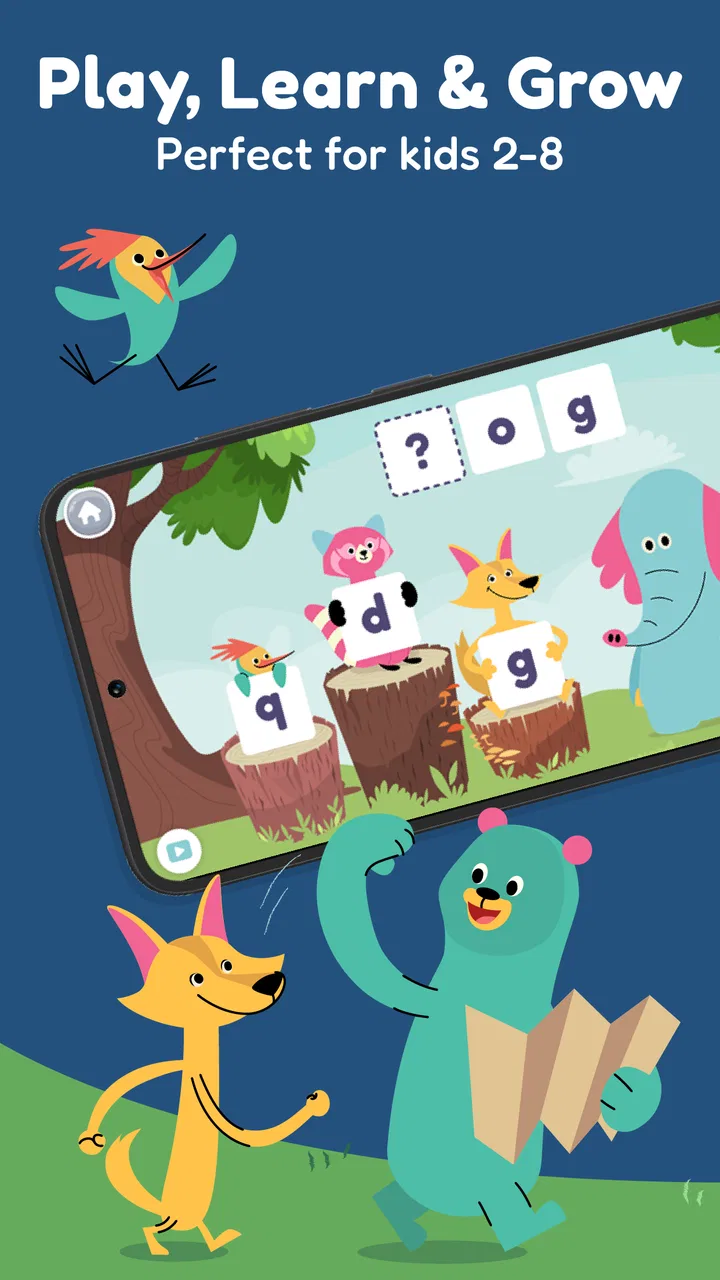
When a young child needs a little more practice with early reading or basic math, the hardest part is often getting started without turning the moment into a struggle. I tested Khan Academy Kids as an education app for that exact situation, and I found it most useful when it became part of a short, calm routine rather than a replacement for an adult, teacher, or book. The activities are aimed at children from ages two to eight, with playful lessons covering reading, math, and related early-learning skills.
The app is free, carries an Everyone age rating, and comes from Khan Academy. That combination makes it easy to consider for a family that wants a no-cost learning option before committing to a paid children’s subscription. Its average rating is 4.6 from around 54 thousand ratings, and it has passed 10 million installs, so it is clearly familiar to many families. Still, popularity is not the same as a perfect fit. The important question is how it works in a real household, especially when a child loses focus, needs help, or is ready for something more advanced.
From a spare five minutes to a useful learning routine
I like to begin with a small, clear aim rather than asking a child to keep exploring until something sticks. A few minutes spent noticing whether they respond best to sounds, counting, or a visual prompt can help you choose a better starting point next time. That makes the routine easier to adapt, and it leads naturally to the practical question of how to guide a first session without taking over.
You May Also Like

 Blood Strike: 2.5 Anniversary
Blood Strike’s Loadouts Turn Every Drop Into a Tactical Gamble
A close look at Blood Strike’s custom loadouts: how fast access to signature weapons reshapes its battle royale rhythm, rewards preparation, and narrows the gap between fights.

 Pandora - Music & Podcasts
Pandora’s Music Is Easy to Start, but Harder to Recover
Pandora’s strength is its low-effort path from a seed to a station. Its weak spot is how much confidence it asks you to place in connection, setup, and quiet recovery.

 8 Ball Pool
 Is Built on Rivalries, Rematches, and Routine
A close look at the rivalries, rematches, shared routines, and unanswered safety questions that turn a quick pool match into a persistent mobile community.

 Samsung Music
’s Quiet Strength Is Playing What You Already Own
Its reach comes less from spectacle than from dependable access to a personal library. That simplicity is both the app’s strongest retention engine and its ceiling.

 AccuWeather: Weather Radar
AccuWeather Review: A Quick, Clear Forecast for Everyday Decisions
For everyday plans, the best forecast is the one you can understand quickly. AccuWeather makes rain timing, radar, and local conditions easy to act on, with a few trade-offs.

 Hill Climb Racing
Why Hill Climb Racing Still Turns Crashes Into One More Run
A tiny car, a bumpy hill and one more upgrade: Hill Climb Racing keeps resurfacing because its simple chaos makes every near-miss feel personal.
More From Our News Desk



The starting point: deciding what the child actually needs
I would not begin by handing over the phone and expecting the app to choose the ideal learning path by itself. A better starting condition is specific: perhaps a preschooler is mixing up letter sounds, a child in the early school years needs extra counting practice, or a parent wants a quiet activity for the period before dinner. The age range is broad, and a two-year-old and an eight-year-old will not approach the same library in the same way.
That matters because early learning is personal. One child may enjoy tracing and recognizing letters, while another may already read simple words but need more confidence with numbers. Before opening the app, I would decide whether the goal is practice, introduction, or simply a gentle review. That small decision makes the session feel purposeful and helps prevent random tapping from becoming the whole experience.
The app is especially well suited to families that want learning to feel less formal. Its child-focused presentation makes it easier to invite a reluctant learner into an activity than a worksheet might. On the other hand, it is not the right first choice for a child who needs a tightly controlled curriculum, detailed teacher reporting, or advanced subject instruction. In those cases, a school platform, specialist tutoring app, or printed program may offer better oversight.
Setting up the first session without taking over
My preferred approach is to sit with the child for the first session and watch how they respond. I would let the child make some choices, but I would also explain the purpose of the activity in simple language: “Let’s try a few letter games,” or “We’ll practice numbers for a little while.” This creates a handoff from adult guidance to independent exploration without pretending that the child already knows how everything works.
For a younger child, the adult’s role is more active. A two-year-old may need help understanding what to touch, why an answer is incorrect, or when an activity is finished. An older child may manage more independently, but even then I found that occasional check-ins are useful. The app can present the exercise; it cannot always tell whether a wrong answer comes from misunderstanding, rushing, tiredness, or a finger landing in the wrong place.
One practical tip is to treat the first few uses as observation rather than assessment. Look for the kinds of mistakes the child makes and the activities that hold attention. If a child repeatedly guesses at letter sounds, pause and say the sound aloud together. If number exercises are easy but the child rushes through them, ask for an explanation instead of immediately moving to a harder task. This turns screen time into information you can use offline.
Following the learning path step by step
Once the child is comfortable, the usual flow is straightforward: open the app, choose the child’s learning area or activity, complete a short exercise, and move on when the child is ready. The playful format lowers the pressure of being “tested,” which is one of the strongest reasons I would choose it over a bare quiz app for early learners.
The reading activities are most valuable when they are followed by conversation. If the child works with letters or sounds, I would point to objects around the room that begin with the same sound. After a word-based activity, I might ask the child to find that word in a picture book. The app supplies a focused prompt, while the adult connects it to real language. Without that second step, a child can become good at responding inside the app without building the same confidence away from the screen.
Math practice benefits from the same treatment. After an activity involving counting, I would ask the child to count spoons, blocks, steps, or pieces of fruit. This is a non-obvious strength of the app: its short digital exercises can act as a starting signal for physical practice. The best outcome does not happen when the child remains inside the app for a long stretch; it happens when the lesson gives you an idea for a quick activity in the real world.
I also recommend stopping before frustration becomes obvious. A child who is rubbing the screen randomly, repeating the same answer, or asking to leave may not need more encouragement; they may need a break. Because the app is free, there is no financial pressure to “get your money’s worth” from every session. That makes it easier to keep the routine short and positive, which is a meaningful advantage for families.
How the handoff works between child, parent, and teacher
The most useful workflow involves three people: the child uses the activity, the parent notices patterns, and the teacher or caregiver receives a simple observation when needed. I would not treat the app as a formal record of classroom progress unless a teacher has specifically agreed to use it that way. Instead, I would share concrete observations: “She recognizes most letters but hesitates with sounds,” or “He counts confidently but loses track when objects are arranged differently.”
This handoff is more helpful than saying the child “did well” or “struggled.” It gives another adult something actionable to build on. A teacher can choose a related classroom activity, and a parent can repeat the concept with toys, books, or daily routines. The app becomes one part of a learning loop rather than an isolated screen.
There is also a handoff between the app and the child’s independence. I would gradually reduce my help instead of disappearing immediately. First, I might explain the instructions. Later, I would ask the child to tell me what to do. Eventually, I would stay nearby without answering every question. This staged approach is particularly important for children who become dependent on an adult to confirm every tap.
Families with more than one child should also be careful about assuming that one routine will suit everyone. A preschooler may need frequent encouragement and physical examples, while an older child may prefer to work alone and discuss results afterward. The same app can support both situations, but the adult handoff needs to change.
What the child gets at the end of a session
The result I would aim for is not a certain amount of screen time or a collection of digital rewards. It is a child who can explain one thing they practiced and try it somewhere else. For example, after a short reading activity, the child might identify a familiar sound in a story. After math practice, they might count objects more carefully during play. Those small transfers are better evidence of value than simply completing another activity.
For parents, the result can be equally practical: a clearer sense of what the child enjoys, where they hesitate, and which offline activity might help next. That makes the app useful even when the child only spends a short time with it. I found that the strongest sessions ended with a simple question such as “What did you learn?” or “Can you show me another example?” The answer reveals whether the child understood the idea or only followed the visual prompts.
The app’s broad age range also means that its usefulness changes over time. For a young learner, it can provide a friendly introduction to letters, numbers, and early concepts. For an older child, it may work better as reinforcement than as the main learning resource. Parents should expect to supplement it with reading together, writing by hand, counting physical objects, and schoolwork that matches the child’s current level.
Where the flow breaks in everyday use
The biggest weakness is not a single broken feature; it is the gap between an attractive activity and genuine understanding. A child can tap quickly, follow familiar patterns, or guess until something works. If an adult never checks in, it may be difficult to know whether the child has learned the concept or simply completed the interaction.
Attention is another pressure point. Young children do not always want the activity an adult has chosen, and even an engaging lesson can arrive at the wrong moment. If the child is hungry, tired, or already overstimulated, the app may become another source of resistance. I would skip the session rather than force it. A free educational tool is only helpful when the child is ready to participate.
The wide age range can also create a mismatch. An activity that feels just right for a preschooler may seem too simple to an older child. Conversely, an older learner who needs structured reading comprehension, writing feedback, or more demanding mathematics may outgrow the app’s early-learning focus. In that situation, a dedicated school resource or teacher-led practice is the better option.
There is a further trade-off between convenience and conversation. A child can use an app independently, which is useful when an adult is preparing a meal or handling another task. But independent use removes some of the explanations and encouragement that make early learning stick. My practical compromise would be to allow brief solo exploration, then reserve a few minutes for discussion afterward. That preserves the app’s convenience without making it the child’s only teacher.
Technical expectations and day-to-day fit
On the device side, the current version is 8.1.2 and requires Android 6.0 or later. That makes it accessible on many older Android devices, although the experience will still depend on the particular phone or tablet, screen size, and general condition of the device. For a child, a larger screen is usually easier to handle than a small phone because tapping and visual details are less cramped.
I would also prepare the device before giving it to a child. Charge it, close distracting apps, and make sure the child is not likely to tap into unrelated content afterward. This is not a criticism unique to this app; it is part of handing any connected device to a young learner. The smoother the transition in and out of the activity, the less likely the session is to end with a dispute over the device.
Because the app is free, it is an easy addition to a family’s learning toolkit, but that should not be confused with zero effort. The adult still has to choose a suitable moment, notice confusion, and connect digital practice with ordinary life. That is the hidden cost in time and attention, and it applies especially to the youngest children.
How it compares with books, worksheets, and other learning apps
Compared with a printed worksheet, this app is more inviting for children who resist handwriting or become discouraged by visible mistakes. It offers a more playful entry point and can make repeated practice feel less repetitive. A worksheet is still better when the goal is pencil control, letter formation, or a quiet activity that does not require a charged device.
Compared with reading a physical book together, the app is more interactive but less naturally conversational. A book gives an adult many chances to ask questions, explain unfamiliar words, and notice the child’s reactions. I would use the app to rehearse a skill and books to deepen language, imagination, and discussion. Neither one fully replaces the other.
Compared with a narrowly focused phonics or math app, Khan Academy Kids is broader. That is helpful for families wanting one early-learning space rather than several specialized tools. The trade-off is that a child with one clearly defined difficulty may progress faster with a resource built entirely around that skill. I would choose this app for variety and gentle practice, not as the only intervention for a persistent learning challenge.
It also differs from formal school platforms because it feels more like a child-directed learning environment than a classroom dashboard. That makes it approachable, but parents looking for detailed assignments, teacher messaging, or rigorous progress documentation should look elsewhere. The right comparison depends on whether the priority is comfort and exploration or accountability and curriculum control.
Who should use it, and who should move on
I would recommend it to parents of young children who want a free, approachable way to practice early reading and math. It is a particularly good fit when the adult is willing to sit nearby at first, turn activities into real-world examples, and keep sessions short. It can also help grandparents, babysitters, and caregivers offer a familiar learning routine without needing to prepare worksheets.
I would be more cautious for families expecting the app to diagnose a problem, replace a teacher, or guarantee steady progress without adult involvement. Children who need specialized instruction, older learners seeking challenging academic content, and families that dislike screen-based learning may be better served by a different option. The app should support a learning routine, not carry the entire responsibility for it.
My overall impression is positive because the app makes early practice approachable and removes the price barrier. Its real value appears when a child moves from a digital prompt to a spoken answer, a book, a toy, or an everyday counting task. The best workflow is simple: choose one goal, let the child try, watch for confusion, and carry the idea off-screen.
After using it in that way, I see Khan Academy Kids as a dependable starting point rather than a complete early-education system. The free access, Everyone rating, broad learning focus, and support for Android devices running version 6.0 or later make it easy to try. Just keep expectations realistic: it can open the door to practice, but the adult’s explanations, patience, and follow-through are what turn that practice into learning.
FAQs for Khan Academy Kids
01What is Khan Academy Kids and who is it designed for?
Khan Academy Kids is an educational app designed for children aged 2 to 8. It offers a variety of engaging learning activities across subjects like math, reading, and social-emotional development. The content is tailored to support young learners with interactive lessons, games, and stories, fostering a fun and educational experience.
02Is Khan Academy Kids free to use?
Yes, Khan Academy Kids is completely free to use. The app is funded by donations and grants, ensuring that families and educators can access all its features without any cost. There are no ads or subscription fees, making it an accessible resource for quality early education.
03What kind of content does Khan Academy Kids offer?
The app provides a wide range of educational content, including interactive videos, games, and activities focused on literacy, math, language, and social-emotional skills. It also includes creative exercises such as drawing and storytelling, helping to develop critical thinking and problem-solving skills in young children.
04Is Khan Academy Kids suitable for classroom use?
Yes, Khan Academy Kids is suitable for both home and classroom settings. Teachers can create and manage student accounts, track progress, and customize learning experiences. The app's flexible design allows it to complement existing curriculums, providing additional support for diverse learning needs.
05Can parents track their child's progress on Khan Academy Kids?
Parents can easily track their child’s progress through the app’s dashboard. It provides insights into the child's learning journey, highlighting areas of strength and opportunities for improvement. This feature helps parents stay informed and involved in their child’s educational development.
Pros
- Engaging
- interactive learning experience.
- Wide range of educational content.
- Suitable for pre-school to early grades.
- No ads
- creating a safe environment.
- Supports offline access for learning.
Cons
- Limited content for higher grade levels.
- Requires initial setup by parents.
- No real-time teacher interaction.
- Some activities may seem repetitive.
- Graphics may not engage older kids.

Khan Academy Kids
Gallery